Email Setup
Desktop
Thundebird
Outlook
Mobile
Iphone
Android
AI Features
AI Customer Service
AI Positioning
AI Product Tools
AI Suggestion
AI Handbook
AI Page Editor
AI-assisted Content Engine (A.C.E)
AI Profile & AI Prompt Refine
Global AI Content Generator
AI Service Tools
AI FAQ
AI Brochures PDF
Website Management
Login NEWPAGES Merchant System (NMS)
NMS Switch Language
Dashboard
Manage Products
Manage Service
Manage Photoalbum
Manage News / Promotion
Manage Ratings & Reviews
Manage Google Reviews
NMS Merchant App
Profile Setting
Support
Update Form
Report
NP Merchant Points
NMS Credit
Manage YouTube
Manage Career
Manage Download
Website Setting
Account Setting
Content Generator
Manage Others (Gallery)
Manage Testimonials
SEO Guide
On-page Optimization
e-Commerce (My Sales)
Dashboard
Order Management
Invoice
Shipping
Delivery List
Packaging & Picklist
Self Pick Up Setting
Shipping Setting
No available shipping method
Easyparcel
Lalamove
Tracking.my
Members
Marketing Tools
Voucher
Birthday Campaign
Discount Campaign
Add-on Deals
Mix & Match
Purchase Link
Broadcast Management
Product Sold & Customer Report
Ecommerce Mail Setting
Popup & Social Proof
Checkout Cart Setting
Website Header Setting
Additonal Charges Setting
Notification Setting
e-Commerce Process (Add to Cart Flow)
Plugins
Activate Plugin
Marketplace Synchronization
Tiktok Sync
Lazada Sync
Shopee Sync
Affiliate Marketing & Referral
Membership & Loyalty Program
Checkout & Payment Link
Quotation Pro
Sales Landing Page
Whatsapp Cart & Chat
Product Comparison
Social Media Synchronization
Facebook My Chatbot
Booking System
BusinessTag
E-Invoice Customer Profile
Warranty System
PDF Encryptor
Background Removal
Mantap
FREE MANTAP
NEWPAGES Official API
NEWPAGES Apps Management
CRM System
Spam Expert - Domain Level
Dashboard
Incoming
Logs
Delivery Issue Log
Spam Quarantine
Domain Statistics
Train Messages
Incoming - Protection Settings
Recipient Allow List
Recipient Block List
Sender Allow List
Sender Block List
Allow List Filtering Rules
Block List Filtering Rules
Customise Actions
Filter Settings
Attachments Restrictions
Email Size Restrictions
Continuity
Delivery Queue - Incoming
Compose Email
My Settings
Domain
Webmail
Setup Signature
Delete Email
Adjust Spam Score
Set Autoresponders In Webmail
Reset Password
Admin Email System
Knowledge Tips
Email Issues
Demonstration
Progressive Web App Ready (PWA)
Select Categories
Email Setup
Desktop
Thundebird
Outlook
Mobile
Iphone
Android
AI Features
AI Customer Service
AI Positioning
AI Product Tools
AI Suggestion
AI Handbook
AI Page Editor
AI-assisted Content Engine (A.C.E)
AI Profile & AI Prompt Refine
Global AI Content Generator
AI Service Tools
AI FAQ
AI Brochures PDF
Website Management
Login NEWPAGES Merchant System (NMS)
NMS Switch Language
Dashboard
Manage Products
Manage Service
Manage Photoalbum
Manage News / Promotion
Manage Ratings & Reviews
Manage Google Reviews
NMS Merchant App
Profile Setting
Support
Update Form
Report
NP Merchant Points
NMS Credit
Manage YouTube
Manage Career
Manage Download
Website Setting
Account Setting
Content Generator
Manage Others (Gallery)
Manage Testimonials
SEO Guide
On-page Optimization
e-Commerce (My Sales)
Dashboard
Order Management
Invoice
Shipping
Delivery List
Packaging & Picklist
Self Pick Up Setting
Shipping Setting
No available shipping method
Easyparcel
Lalamove
Tracking.my
Members
Marketing Tools
Voucher
Birthday Campaign
Discount Campaign
Add-on Deals
Mix & Match
Purchase Link
Broadcast Management
Product Sold & Customer Report
Ecommerce Mail Setting
Popup & Social Proof
Checkout Cart Setting
Website Header Setting
Additonal Charges Setting
Notification Setting
e-Commerce Process (Add to Cart Flow)
Plugins
Activate Plugin
Marketplace Synchronization
Tiktok Sync
Lazada Sync
Shopee Sync
Affiliate Marketing & Referral
Membership & Loyalty Program
Checkout & Payment Link
Quotation Pro
Sales Landing Page
Whatsapp Cart & Chat
Product Comparison
Social Media Synchronization
Facebook My Chatbot
Booking System
BusinessTag
E-Invoice Customer Profile
Warranty System
PDF Encryptor
Background Removal
Mantap
FREE MANTAP
NEWPAGES Official API
NEWPAGES Apps Management
CRM System
Spam Expert - Domain Level
Dashboard
Incoming
Logs
Delivery Issue Log
Spam Quarantine
Domain Statistics
Train Messages
Incoming - Protection Settings
Recipient Allow List
Recipient Block List
Sender Allow List
Sender Block List
Allow List Filtering Rules
Block List Filtering Rules
Customise Actions
Filter Settings
Attachments Restrictions
Email Size Restrictions
Continuity
Delivery Queue - Incoming
Compose Email
My Settings
Domain
Webmail
Setup Signature
Delete Email
Adjust Spam Score
Set Autoresponders In Webmail
Reset Password
Admin Email System
Knowledge Tips
Email Issues
Demonstration
Progressive Web App Ready (PWA)
AI Page Editor
July 13, 2026What is AI Page Editor?
AI Page Editor allows you to create a custom webpage on your own, with no coding or programming knowledge required.
Currently, AI Page Editor only applicable to selected package. Refer to your Account Manager for package eligibility
Where to find AI Page Editor?

Log in to NMS. On the Dashboard Menu, go to Manage > Ai Page Editor
How to Use AI Page Editor?

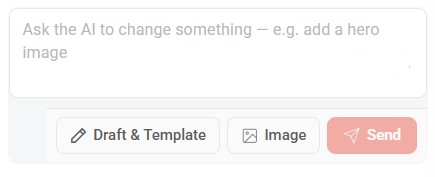
There are two (2) ways to start building your page. You can:
- Click Draft & Template to select existing templates or draw it yourself
- Upload a screenshot image of a website design you like and ask AI to redesign it.
Draft & Template - Template Selection
Select your preferred template to prepare for an AI prompt.


Click "Edit Content" button to start editing.
Edit according to your language subscription.
You may also edit according to Desktop, Tablet or Mobile template.
Edit according to your language subscription.
You may also edit according to Desktop, Tablet or Mobile template.

Everything that you see is editable (text, images) simply by clicking on the field you wish to edit.

Or, instruct in AI chat box on how you want your page to be.

Once done, click "Editing - click to finish" button to complete the editing.

You can restore to the previous version under the "Version History" tab

Revert - Clear and reset to blank page
Translate - Translate content to BM or CN
Cancel - Cancel the project and return to AI Page Editor dashboard
Save Draft - Save the current project
Publish All - Publish page to go online
Translate - Translate content to BM or CN
Cancel - Cancel the project and return to AI Page Editor dashboard
Save Draft - Save the current project
Publish All - Publish page to go online
Draft & Template - Draw
Draw your template to prepare for an AI prompt.